Be a Soccer Legend Codes & How to Redeem
Check the known promo codes for Be a Soccer Legend on Roblox, including RELEASE and Legend, plus step-by-step instructions to open the code menu.
Known Be a Soccer Legend Codes
Below are the promo codes documented from the official Be a Soccer Legend Roblox description and reviewed community gameplay footage. Because developers can change or expire codes at any time without notice, the message shown inside your game client when you press Redeem is always the final authority.
| Code | Source & Observed Reward | Notes |
|---|---|---|
| RELEASE | Listed directly in the official Roblox game description; exact reward amount is not stated on the description page. | Enter with all capital letters as shown on the game page. |
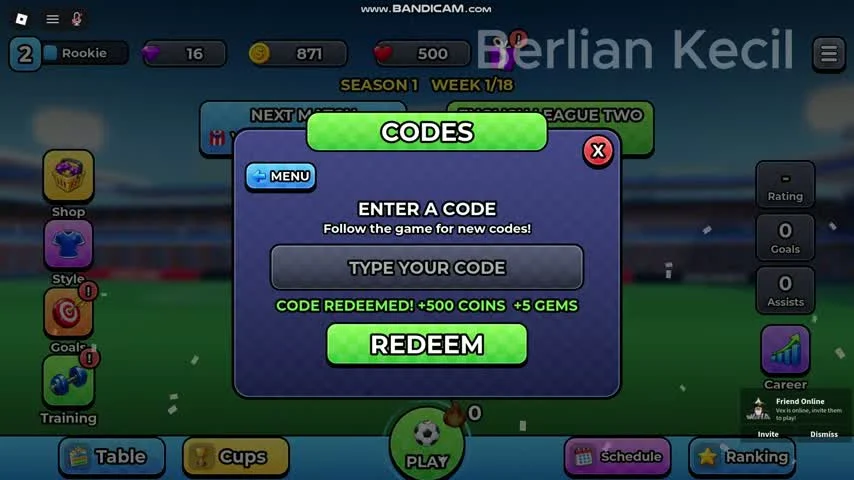
| Legend | Observed in community gameplay footage granting +500 COINS and +5 GEMS upon redemption. | We have not independently re-tested whether this code remains active today; try it in-game to see if it is still accepted. |
How to Redeem Codes in Be a Soccer Legend
Redeeming a code takes only a few seconds from the main career dashboard. Follow the exact menu path seen in gameplay:
- Launch the game and wait for the main career screen.
- Open the hamburger menu at the top right and choose Codes.
- Enter the exact code in ENTER A CODE.
- Press REDEEM and read the response. MENU returns to the menu; close it when you want the hub.
If the code is accepted, a confirmation banner reading CODE REDEEMED! appears on screen along with the coins or gems added to your balance.
Why a Code Might Not Work
If a code does not go through, check your capitalization first, for example, enter RELEASE in all caps and Legend with a capital L. Also make sure there are no extra spaces before or after the word in the input box. If the spelling matches and the game still rejects it, read the actual response for an already-used, invalid or expired message. A server or temporary interface problem can also require a later retry.